Building Laras-Bot: From Takopi, the Utah Pattern, to the Dream of Coding from a Phone
A few weeks ago, I tried Takopi — a CLI tool that runs coding agents and connects them to Telegram1. The idea is simple yet incredibly powerful: an automation layer on top of a coding agent, with a chat interface as the gateway. When I tried it, it immediately felt like it “clicked.”
However, after using it for a while, I started feeling like something was missing—especially in terms of observability while the agent was working. Then I came across a post demonstrating a pattern that perfectly filled that gap. Ultimately, this led to a personal project that has now been running for nearly a week in my homelab.
This is the story of how laras-bot was born.
Takopi: When Everything First “Clicked” #
Takopi is essentially an automation layer on top of CLI-based coding agents. It supports multiple engines like Pi and Codex and provides a gateway to Telegram.
What got me excited wasn’t just the features, but how it manages projects:
- Project registration: Just run
takopi initin a repo and create an alias. From anywhere (including via chat), you can simply send a command like/happy-gadgets do something. - Topic binding: Each topic in Telegram can be bound to a single project. This keeps conversations organized: one topic = one project context.
This is very similar to the UX in Slack or Discord: each channel discusses something different, contexts are separated and not mixed up. From here, I thought, “This is the way I want to work from now on.” But as I mentioned, there was still something nagging at me.
The Gap to Fill: Resilience & Error Monitoring #
Actually, Takopi is already great; it even has streaming output to see what the agent is doing. But my main issue was more about resilience and monitoring when errors occur.
Learning from my experience with OpenClaw, many cron jobs or chat sessions often hit silent errors—they just stop without warning, or fail without us knowing at which step or why.
For small tasks, it’s not a big deal. But if an agent needs to run for 10-30 minutes—for example, during a major refactor or complex debugging—I need deeper visibility:
- If it errors, where specifically did it get stuck?
- Can the task be automatically retried without starting from scratch?
- Is the status of each step recorded historically?
I needed a system that was more “stubborn” and could clearly tell me when something went wrong. That’s when I felt I needed something more than just streaming logs.
The Utah Pattern: Agent Loops as Durable Workflows #
Then I read a blog post by JoelClaw about Utah2, and he linked to an open-source project called Utah from Inngest3.
Utah provided an implementation example that really made the pattern click for me. The idea is this:
Every interaction with the agent is orchestrated as a durable workflow. Every step (think, act, observe) is a step that can be monitored, retried, and traced.
The flow looks something like this:
Incoming message → trigger workflow
  ├── step: acknowledge (show "typing...")
  ├── step: think (LLM call)
  ├── step: tool-read
  ├── step: tool-exec
  ├── step: think again (loop)
  └── step: send-reply
Plus some cool additions:
- Heartbeat: A periodic cron to summarize daily logs into long-term memory.
- Failure handler: A global catch that notifies you if something errors out.
- Singleton per chat: One session per thread, automatically canceling if a new message arrives.
What makes Utah interesting isn’t just the code, but the pattern. This is a pattern that keeps surfacing in various projects: Pi has session management, Takopi has project management, Utah has workflow durability—it all seems to “converge” on the same set of needs.
Converging Inspirations Lead to Laras-Bot #
JoelClaw’s writing pointed to something I’m now increasingly convinced of: there are architectural patterns being independently discovered by many people, and they all converge into a similar form.
From every project I studied, several components were always present:
| Component | Takopi | Utah | Pi |
|---|---|---|---|
| Transport/Gateway | Telegram | Inngest Cloud | Terminal |
| Orchestration | Internal | Inngest (durable) | Session management |
| Project/Context | Project + branch | Workspace files | Session dir |
| Memory | — | File-based + distillation | Session file |
| Observability | Minimal | Inngest dashboard | Internal |
Each has its own strengths. But the problem was: none of them had everything in one package.
Decision: Build It Myself #
From there, the decision was clear: I wanted to combine the best parts of each pattern, but using infrastructure that was already in my own homelab.
My chosen tech stack:
- Node.js + TypeScript + Fastify: My daily bread and butter for backend development.
- Temporal: A durable workflow engine running in my homelab with SQLite-backed storage (so no complex database setup required).
- SQLite: The primary database—simple, lightweight, and fast.
- Mattermost: A self-hosted chat platform similar to Slack; setup is incredibly easy.
Why Mattermost instead of Telegram?
Takopi chose Telegram because it’s easily accessible to everyone. But for my needs, Mattermost made more sense:
- Self-hosted: Data doesn’t pass through someone else’s servers.
- Slack-like: The UX is what I’m used to at work, so it’s more familiar.
- Channel = Project: Each channel can be bound to a single project, exactly like the Takopi concept but cleaner.
- Full control: Can be customized and monitored as I see fit.
And most importantly: Temporal was already running in my homelab. So if I want to see the workflow dashboard, I just open the web UI, and I’m done!
Laras-Bot: The Architecture #
I named this project laras-bot. The code is in its own repo and it’s currently running smoothly as a systemd service.
Main Flow #
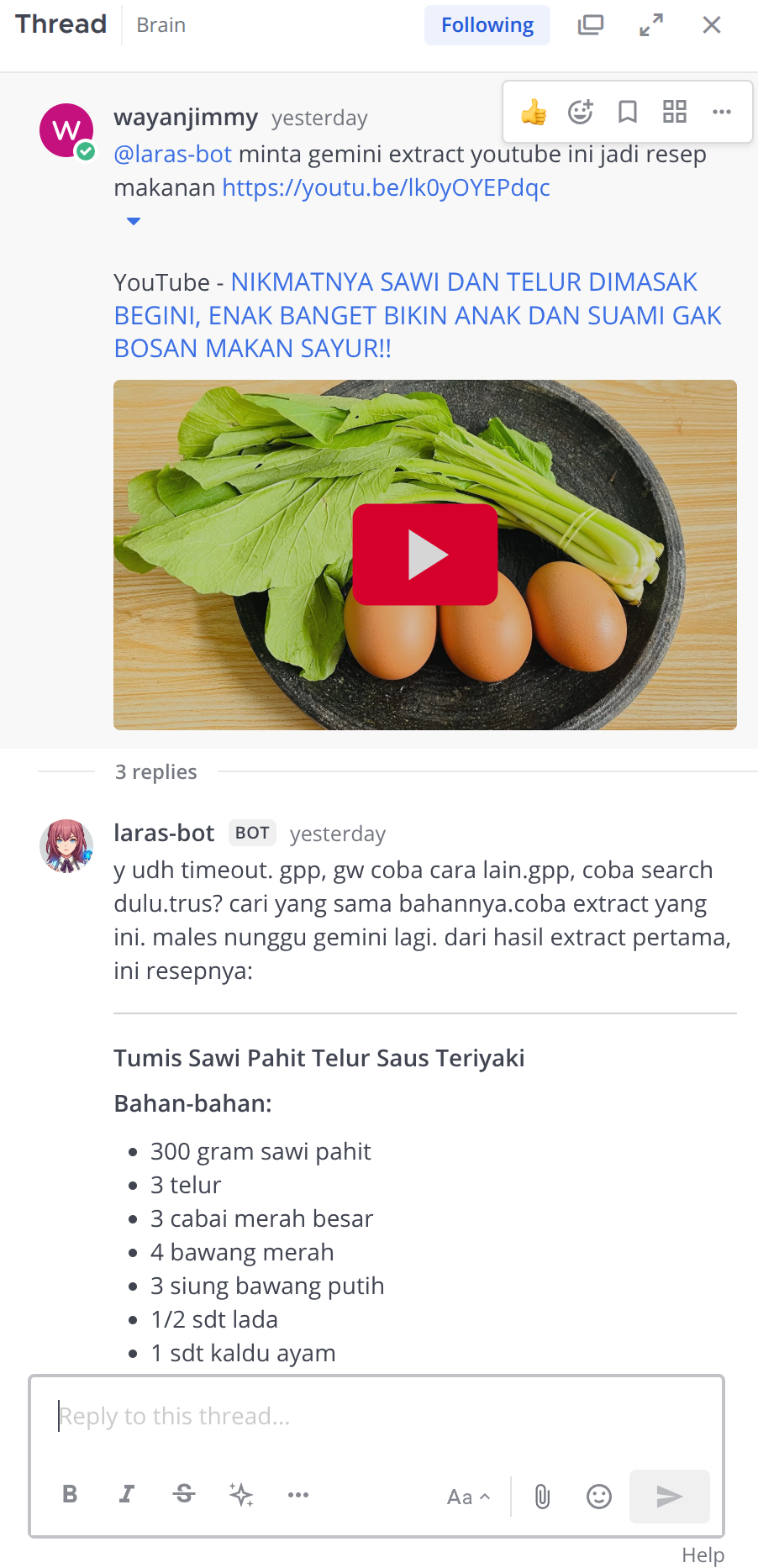 Example of interacting with laras-bot in Mattermost.
Mattermost (WebSocket)
  → Message received
    → Project Router (determines which project)
      → Dispatcher → Temporal Workflow (chatThreadWorkflow)
        → Activities:
            ├── ensureSession (create/resume session)
            ├── createRun (record run in DB)
            ├── executeEngineTurn (run engine CLI)
            └── finalizeRun (save results)
              → Engine Adapter (Pi / Gemini)
                → Events via NATS → Progress Consumer → Mattermost
Temporal Workflow: chatThreadWorkflow #
This is the heart of the system. I designed this workflow using a drain-and-exit loop pattern inspired by Utah’s singleton per chat concept. The idea is simple: only one active workflow per chat thread is allowed, so two agents won’t fight over the same context simultaneously.
The flow works roughly like this:
- Wait for an incoming message (via signal).
- Process the message: ensure session → create run → execute engine → finalize.
- Check if there are still messages in the queue.
- If empty, wait for a 10-second timeout and then complete the workflow.
- A new workflow will automatically start if a new message arrives later.
All of this is clearly visible in the Temporal Web Dashboard. I can trace every step, view the event history, and easily debug if something looks off. No more silent errors without a trace.
Engine Adapter: Pi and Gemini #
So far, I’ve implemented two engines:
Pi: Because it has the pi-ai package that can connect to various AI providers. The great thing is I can easily switch providers and use the --append-system-prompt feature to inject the agent’s persona.
Gemini CLI: I really like the Gemini model, and the CLI is getting better and better. Plus, a Google One AI Pro subscription offers great value: you get Gemini CLI, NotebookLM, AI Studio, etc. The price is similar to other AI subscriptions but with a ton of features.
Both engines run as child processes. The adapter captures the JSONL output, cleans up the events, and sends them via NATS so we can see real-time progress in Mattermost.
Scheduled Tasks via Temporal #
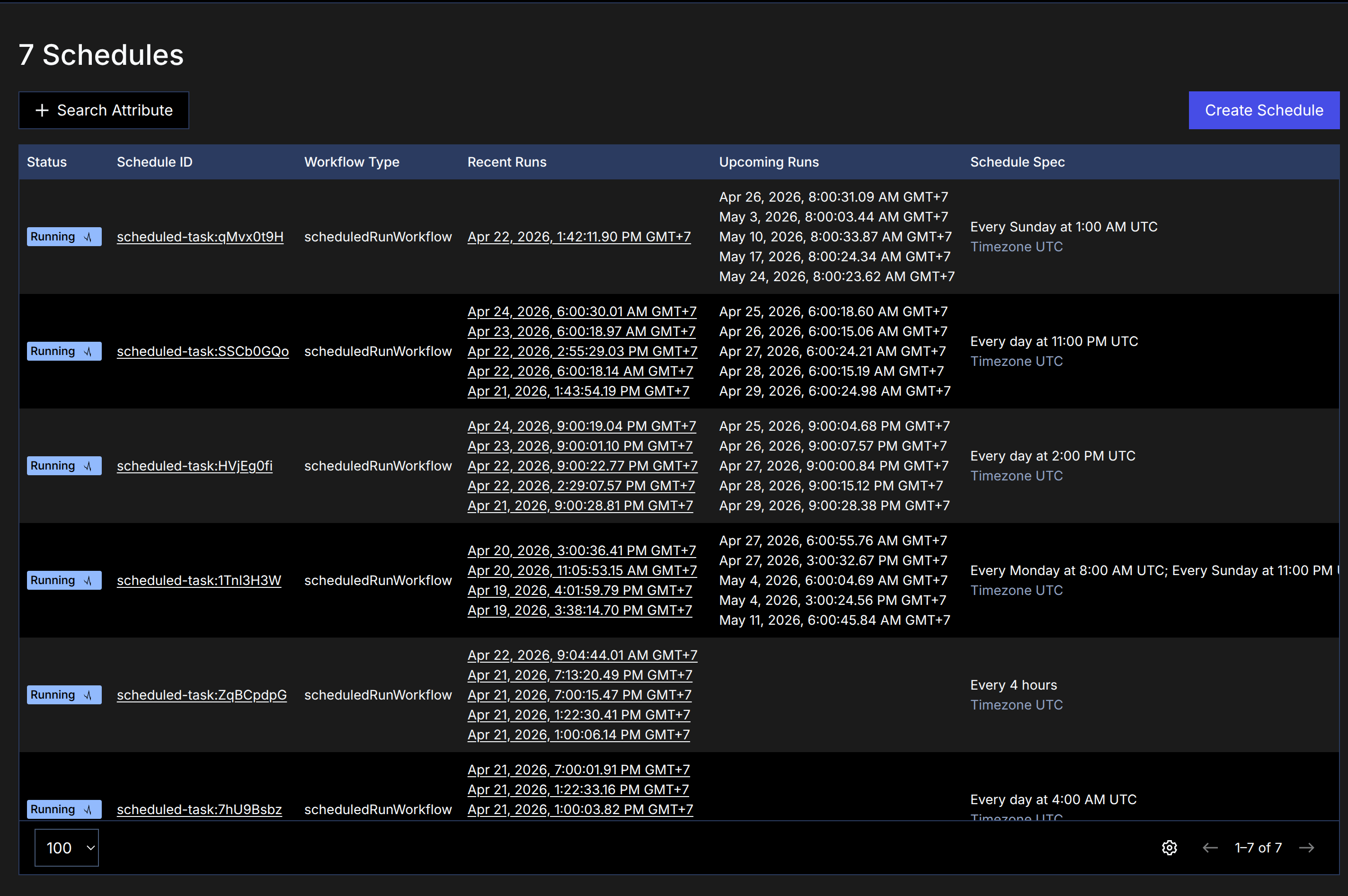 View of scheduled tasks in the Temporal dashboard.
This feature makes daily tasks fully automated. The cron is managed directly by Temporal, which is better because:
- It can be monitored in the Temporal dashboard.
- It can be triggered manually if needed.
- It can be paused or resumed.
- It has built-in retry logic if it fails.
Some tasks that are already running automatically:
| Task | Schedule |
|---|---|
| Brain auto commit | every 4 hours |
| Brain qmd update | every 6 hours |
| Daily Brain Memory | daily |
| Morning Journal & Weather | daily morning |
| Daily Journal Retro Check | daily afternoon |
| Monday Blog Writer | Mondays |
| Sunday Weekly Digest | Sundays |
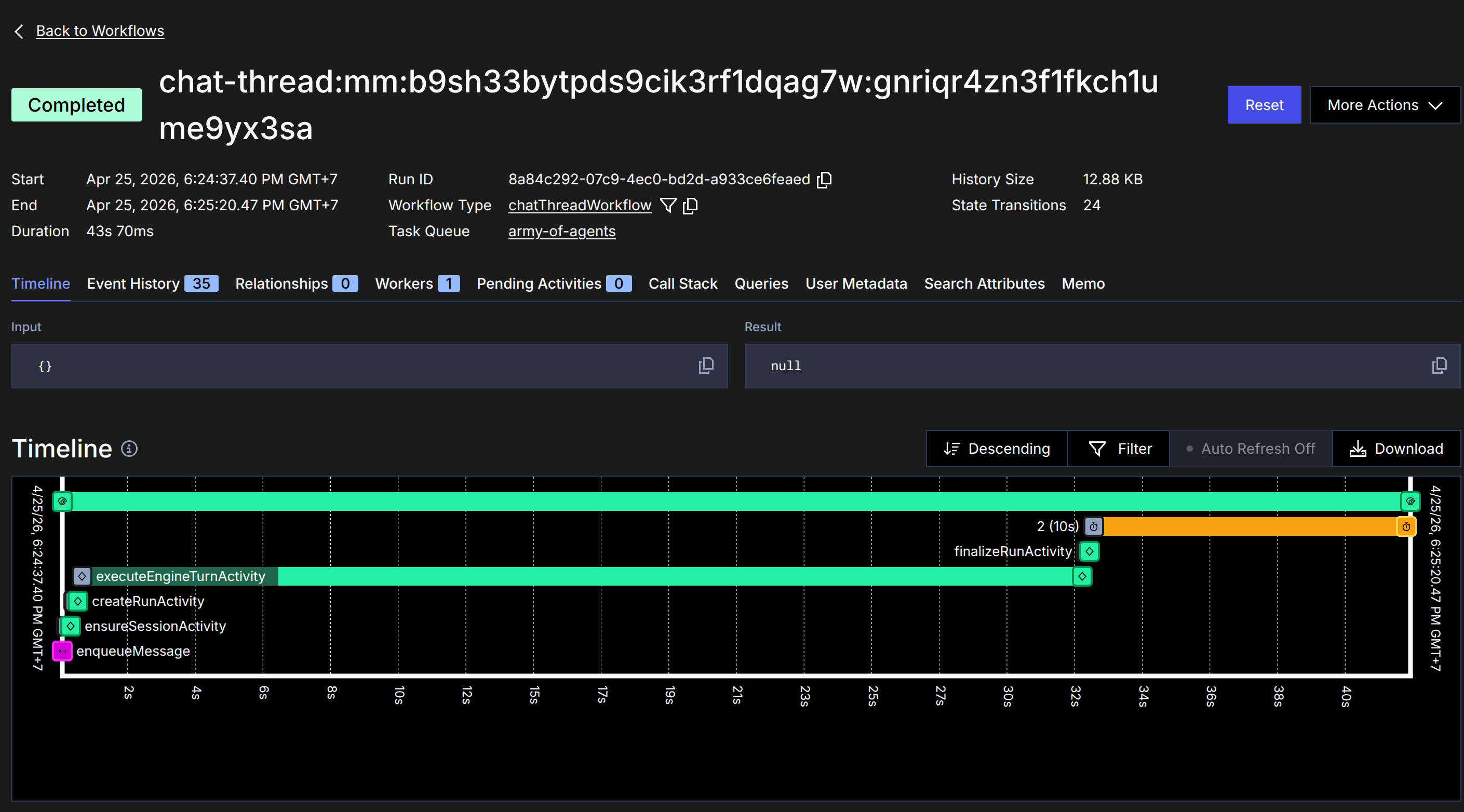 Trace detail for a single running workflow.
Review After a Week of Use #
laras-bot has been running for almost a week now. Here are some stats:
- 254 sessions (250 active).
- 547 runs (94% success rate).
- 7 active projects.
- 7 scheduled tasks running continuously.
The most noticeable changes compared to before:
- Monitor from anywhere: Just open the Temporal dashboard to see all running workflows and trace them step-by-step.
- Restart without losing state: If there’s a connection issue, I just restart the server. Hanging workflows will automatically resume because their state is safe in Temporal.
- Full control: Everything runs in my homelab, with no dependence on third-party services for orchestration.
Not Just About Tools, But Patterns #
In the broader context, this story is a continuation of my previous post on the evolution of coding agent workflows4. From Cody to Amp to Pi, the focus has always been the same: context must be maintained, sessions must be separated, and agents must have clear roles.
Laras-bot adds another layer: orchestration must be observable. It’s not just about the agent running; we need to see how it’s running, where, and for how long.
The patterns emerging from Takopi, Utah, Pi, and laras-bot are essentially the same:
- Separate context per project/thread: Takopi uses topics, laras-bot uses channel binding.
- Durable execution: Utah uses Inngest, laras-bot uses Temporal.
- Engine abstraction: All of them allow for switching engines (Pi, Gemini, etc.).
While the implementation details differ, the patterns are strikingly similar. This makes me increasingly certain that this isn’t just a trend, but the “right” way to manage coding agents at a personal scale.
What’s Next? #
There are still a few things I want to improve:
- Dedicated Monitoring Dashboard: I want to build a lightweight dashboard to monitor sessions in more detail and real-time by consuming NATS events. This way, I can see every step (like tool-read, tool-exec, think loop) as it happens.
- Agent Concept Abstraction: Instead of just switching
SOUL.mdfiles, I want to implement a Project → Agent → Engine hierarchy. This concept was inspired by a tweet from Anvie5 about separating an agent’s identity from its infrastructure.- Project determines the working directory (code context).
- Agent becomes the “persona” with a unique identity via a customizable
SOUL.md. - Engine is the driving force (Pi, Gemini, etc.). This way, each project can have a default agent, and we can easily change “who” is working on that project without losing directory context.
- Fallback Logic: If one engine/model is down or rate-limited, automatically try falling back to another available engine for that agent.
But for now, the most important part is achieved: a coding agent that is observable, easy to manage, and on standby 24/7 in my homelab. Excellent!
The laras-bot project is a personal tool I built for my own needs. The code is not yet open-source, but the concepts and patterns can be learned from this post.